Documentation

Getting started

From installation to the first file uploaded into Google Ads, then to routine upkeep.

01 — Start

Install, then create the action in Google Ads

  1. Upload and activate the plugin. Click identifiers start being kept right away. No setting is needed for it to keep — only the export will ask for one.
  2. Create a conversion action of the Import type in Google Ads, under Goals → Conversions.

    A "Website" source action is not a valid target: you cannot import into it. A dedicated one must be created, even if the site's own action is the one you would like to feed.

  3. Create it as a secondary action, at least at first. The data flows in and can be checked without influencing bidding. Otherwise a campaign on maximise-conversions would see its learning displaced by a month of history arriving at once.
  4. Copy the exact name into Neant → Settings. It must match to the letter, accents included. While it is missing, the screen says so and the export button stays inactive.

    Choose a name that mentions no period. Renaming it later would bypass Google's deduplication, which works on the identifier / action pair — and would reopen the door to double counting.

02 — Reading the screen

Three entries under the menu

ScreenWhat it is for
DashboardSee at a glance what needs action, then the figures for the period.
Ads ConversionsTwo tabs: Imports, the conversions to send; Adjustments, the ones to correct.
SettingsConversion action name, exportable statuses, window, and the automatic feed.
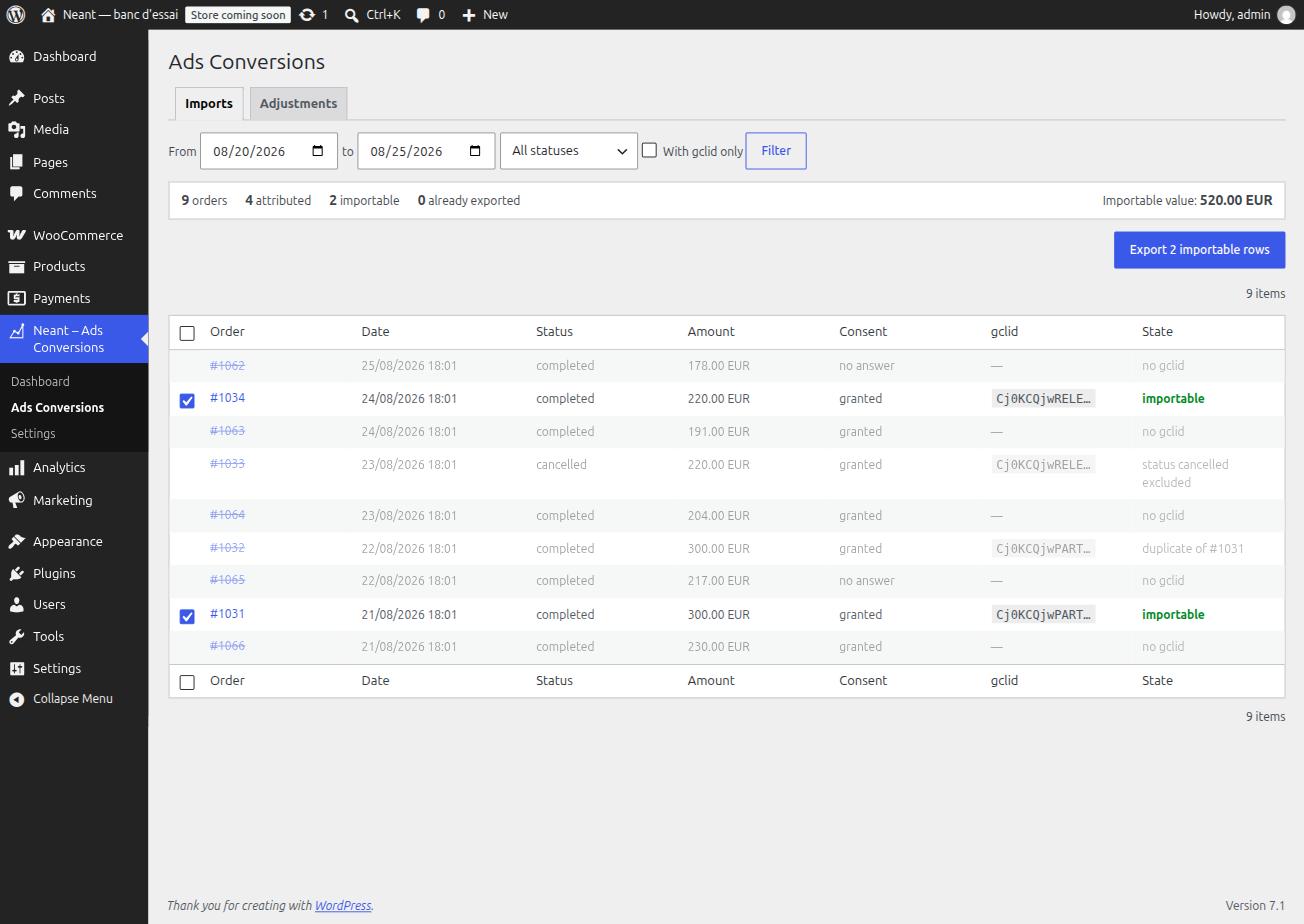
Conversions screen with counters, filters and the order list.
The counters cover the filtered period, not the displayed page.

The mixed-currency total

On a multi-currency shop the cumulative value is not summed: adding euros and Swiss francs produces a number that means nothing. The screen names the currencies present and points to the per-row detail.
03 — Rejection reasons

Why an order does not go out

Non-importable rows stay visible, greyed and struck through. Each carries its reason: that is what lets you understand why fifty-eight attributed orders yield only forty-eight rows in the file.

ReasonMeaningWhat to do
no gclidThe order does not come from a Google Ads click.Nothing. This is the normal case for a good share of traffic.
no captureThe plugin did not run on this order.Check that it is active. Orders placed before it was installed are normally affected.
duplicate of #…One click led to two orders. Google accepts only one.Nothing. The oldest still-valid one is kept automatically.
status … excludedThe status is not in the list of exportable statuses.Adjust the list in the settings if that status should count.
zero valueAmount at zero — a coupon covering the whole order, for instance.Nothing. Google refuses conversions without value.
click older than 90 daysToo old to be imported today.Nothing recoverable. Export sooner next time.
order outside the click windowThe delay between click and order exceeds the attribution window.Nothing. Google would not attribute this conversion.
already exported on …The row went out in a previous file.Nothing, unless Google rejected it: the "unmark" link offers it again.

Double import is the main risk, and it is silent. That is why sent rows are marked. Marking happens on download, not on confirmation: the plugin has no way of knowing what Google accepted. It is a deliberate trade-off, and the reason the unmark link exists.

04 — Exporting

From the button to the import report

  1. Filter the period, check the importable counter and the cumulative value.
  2. Untick rows if you wish. Unticking applies to the displayed page; the rest of the period goes out regardless.
  3. Export — the file downloads and the orders are marked.
  4. In Google Ads, Goals → Uploads, upload the file.
  5. Come back a few hours later and read the import report. It is the only usable trace when the number of rows sent differs from the number of conversions counted — keep it.

What the file contains

Parameters:TimeZone=Europe/Brussels
"Google Click ID","Conversion Name","Conversion Time","Conversion Value","Conversion Currency","Order ID"
Cj0KCQjw…,Achat - import hors connexion,2026-07-31 07:46:18+02:00,335.00,EUR,66658

UTF-8 encoded, decimal point, explicit time zone. No personal data: no name, no address, no email.

05 — Adjustments

When a conversion already sent becomes false

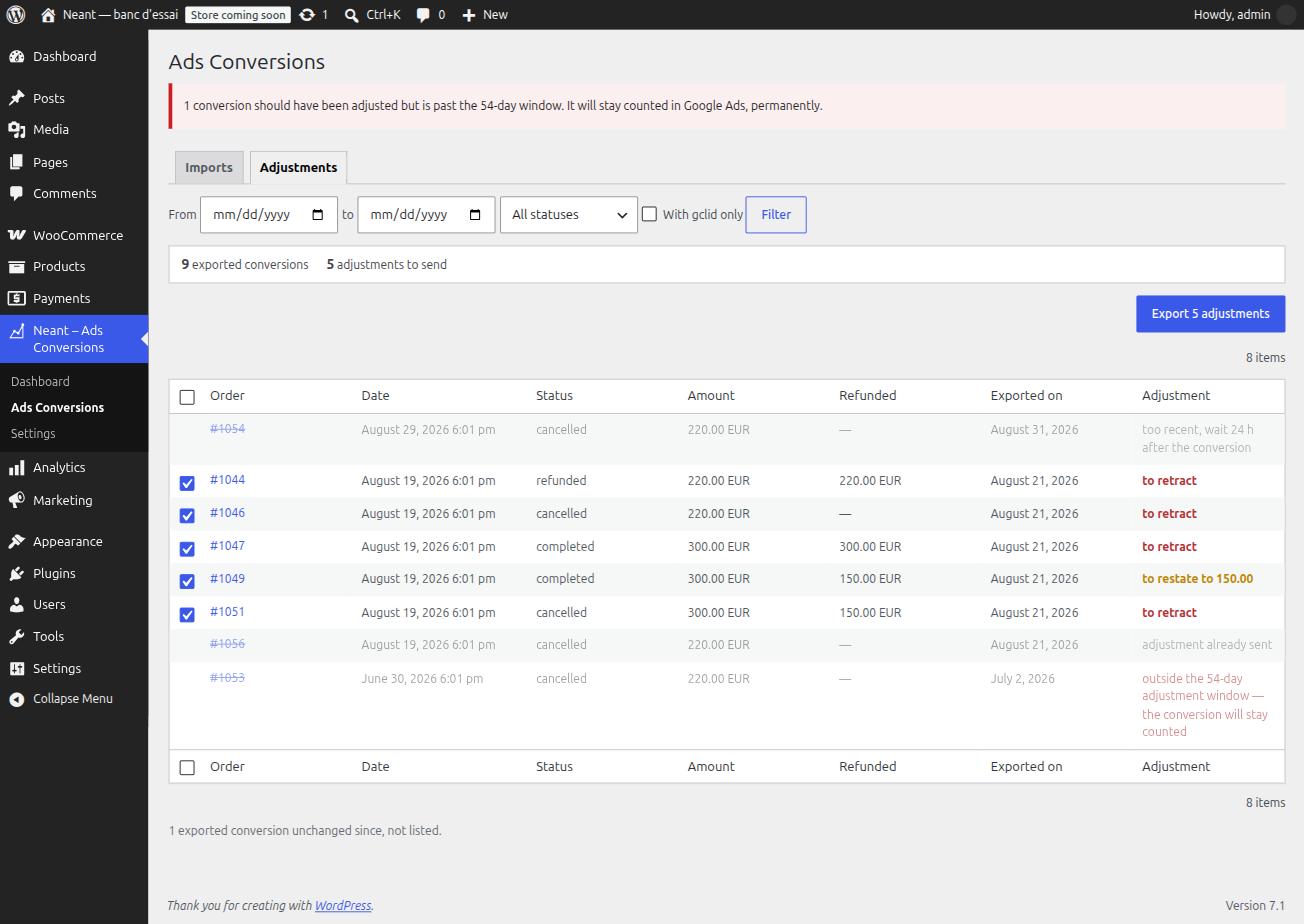
An order exported and then cancelled or refunded stays counted in Google Ads. Eligibility judges the status at export time, and nothing passes again afterwards. The Adjustments tab produces the correction.

State observedAdjustment
Order cancelled, refunded or failedRetraction — the conversion is withdrawn
Partial refundRestatement on the remaining amount
Full refund without a status changeRetraction anyway: the amount decides, not the label

The adjustment window is shorter than the import one: 54 days after the conversion, against 90 after the click. A conversion imported late can therefore be born already irretractable. The screen flags those rows in red — that is all the tool can do, and it beats silence.

Adjustments tab with retractions, one restatement and one row outside the window.
Exported conversions that have not changed are not listed: their number is announced under the table.

06 — Automatic feed

Letting Google fetch the adjustments

Google Ads can poll an address at regular intervals. The option removes the need to upload retractions by hand. It is off by default and covers adjustments only — an import is re-read before being uploaded; an adjustment is mechanical.

  1. Tick the option under Settings → Automatic feed. Address, username and password are generated for you.
  2. Click Test the feed. The button distinguishes the causes of failure instead of announcing an error: untrusted certificate, authentication header stripped by the host, permalinks set to plain.
  3. In Google Ads, Goals → Uploads → Schedules, create a schedule with the HTTPS source and copy the three values. Daily frequency.
  4. Come back the next day: the last-fetch date should have filled in.

If collection stops for more than seven days while adjustments are waiting, a message goes to the configured address. An automatic feed fails silently — its very symptom is the absence of an event.

07 — Upkeep

What to keep an eye on

A question, or something that surprises you? hello@neant.be